- Published on
Deep Agents 进阶:LangChain Deep Agents 集成 Claude Skills 技能指南
- Authors

- Name
- Shoukai Huang

Agent Skills(Photo by Thought Catalog on Unsplash)
目录
- 目录
- Deep Agents CLI
- Deep Agents CLI 集成 Skills 方式
- Deep Agents 集成 Skills 思路
- Deep Agents 集成 Skills 实现
- 总结与展望
- 参考资料
随着 AI Agent 技术的快速发展,如何让智能体具备可扩展的专业技能(Skills)成为构建复杂应用的关键。本文将深入解析 Deep Agents 框架中的技能集成机制,从 CLI 工具的成熟实现出发,探讨如何在 Deep Agents 核心库中构建类似的模块化技能系统。
Deep Agents CLI
Deep Agents CLI 是一款开源的终端编码助手,其交互体验类似于 Claude Code。它不仅提供了便捷的命令行界面,更引入了强大的技能扩展能力,使智能体能够适应多样化的开发场景。
主要特点:
- 内置工具:集成了文件操作(读、写、编辑、glob 通配符、grep 搜索)、Shell 命令执行、网页搜索以及子代理(Sub-Agent)委托等核心功能。
- 可定制技能:通过“渐进式披露(Progressive Disclosure)”技能系统,支持动态添加特定领域的专业技能。
- 持久记忆:Agent 能够在会话之间记忆用户的偏好设置、编码风格以及项目上下文信息。
- 项目感知:自动检测项目根目录,并智能加载项目特定的配置信息。
Deep Agents CLI 集成 Skills 方式
Deep Agents CLI 采用了“渐进式披露(Progressive Disclosure)”的设计模式来集成 Skills(技能)。这种机制通过中间件(Middleware)将技能系统动态注入到 Agent 的运行环境中,实现了灵活且高效的能力扩展。
核心集成原理
整个集成架构主要由两个核心部分组成:
- 运行时集成 (Runtime Integration):通过
SkillsMiddleware将技能元数据动态注入到系统提示词(System Prompt)中。 - 管理集成 (Management Integration):通过 CLI 命令(
commands.py)提供技能的创建、列表查询和详情查看功能。
运行时工作流 (Runtime Workflow)
当在 deepagents_cli/agent.py 中启用 enable_skills=True 时,集成流程按以下步骤执行:
初始化:
SkillsMiddleware被添加到 Agent 的中间件栈中。- 系统自动定位两个技能路径:用户技能目录 (
~/.deepagents/{agent}/skills) 和 项目技能目录 (./.deepagents/skills)。
加载阶段:
- 扫描上述目录,解析每个技能文件夹下的
SKILL.md配置文件。
- 扫描上述目录,解析每个技能文件夹下的
注入阶段 (Prompt Injection):
- 当 Agent 接收到用户请求时,中间件会在 System Prompt 后追加技能列表信息:
## Skills System
...
**Available Skills:**
- **web-research**: Structured approach to conducting thorough web research
  → Read `/path/to/web-research/SKILL.md` for full instructions
...
- 执行阶段 (Progressive Disclosure):
- Agent 感知:Agent 通过列表获知当前可用的技能。
- Agent 决策:如果用户请求(例如“帮我调研一下 X”)与
web-research技能匹配,Agent 会决定调用该技能。 - Agent 行动:Agent 主动调用
read_file工具读取SKILL.md的完整操作指南。 - 执行逻辑:Agent 严格遵循 Markdown 文件中的步骤执行任务,或调用同目录下的 Python 脚本完成具体操作。
CLI 对 Skills 的集成并非通过硬编码的函数调用实现,而是采用了“文档驱动(Documentation-Driven)”的创新方式。CLI 负责文件管理和上下文注入,而 Agent 负责理解文档并执行指令。这种设计赋予了技能系统极高的灵活性,编写技能本质上就是编写一份带有元数据的结构化 Markdown 文档。
Deep Agents 集成 Skills 思路
虽然 Deep Agents CLI 已经原生支持了 Skills 功能,但 Deep Agents 核心 Python 包(截至 2025 年 12 月 16 日)尚未直接提供内置的 Skills 支持接口。这意味着开发者无法直接通过公开 API 或中间件加载 Skills 文件夹。
针对这一现状,我们在 Deep Agents 中集成 Skills 的核心思路如下:
1. 基于 @tool 的脚本封装
将 Skills 关联的脚本封装为标准的 LangChain 工具:
- 集成性:LangChain Agent 天然擅长处理 Python 函数工具。
- 安全性:相比于允许执行任意 Shell 命令的
ShellMiddleware,封装特定的 Python 函数提供了更细粒度的安全控制。 - 易用性:通过清晰的 docstring 为每个工具提供说明,帮助 Agent 准确理解使用场景。
2. 基于 CompiledSubAgent 的能力隔离
采用 CompiledSubAgent 方式封装 Skills 能力,实现子代理的隔离与专业化:
- Deep Agents 的子代理机制非常适合处理特定领域的复杂任务(如 PDF 操作),有效避免了主代理(Main Agent)的上下文过度膨胀。
- 考虑到动态注册的复杂性,我们目前采用“一个 Skill 对应一个 CompiledSubAgent”的静态绑定方式。虽然牺牲了部分动态性,但显著提升了智能体行为的可控性。
3. 基于 PythonREPLTool 的执行环境
- 测试环境:使用
PythonREPLTool提供 Python 代码执行能力,便于快速验证。 - 生产环境:建议替换为 E2B 等沙箱环境,以确保代码执行的安全性。
Deep Agents 集成 Skills 实现
下面我们将以集成 Anthropic PDF Skills 为例,详细演示如何在 Deep Agents 中实现技能集成。该示例将涵盖从文件存储、脚本封装到子代理构建的全过程。
技能文档参考:PDF Skill Documentation
1. 技能文件迁移 (Skill Storage)
首先,将 Anthropic Skills Repository 中的 PDF 技能文件完整复制到项目的 src/skills 目录下。
接着,使用 uv 安装 PDF 处理所需的依赖包:
uv add pdf2image pypdf reportlab pillow
2. 工具代码封装 (Scripts Encapsulation)
为了让 Agent 能够调用这些脚本,我们需要将其封装为 LangChain Tool。以下代码展示了如何通过 @tool 装饰器将原始脚本转换为可被 Agent 调用的工具函数:
import sys
import json
import tempfile
import os
from pathlib import Path
from typing import List, Dict, Optional, Union
from langchain_core.tools import tool

# Add scripts dir to sys.path to support imports within the scripts
# Assuming this file is at src/components/atomic/pdf/pdf_tools.py
# And scripts are at src/skills/pdf/scripts
SCRIPTS_DIR = Path(__file__).parent.parent.parent.parent / "skills/pdf/scripts"
sys.path.append(str(SCRIPTS_DIR))

# Import necessary modules from scripts
try:
   import extract_form_field_info
   import fill_fillable_fields
   import convert_pdf_to_images
   import check_bounding_boxes
   import fill_pdf_form_with_annotations
   import create_validation_image
   from pypdf import PdfReader, PdfWriter
except ImportError as e:
   # This might happen if dependencies are missing or paths are wrong
   # We will let the tools fail at runtime if imports failed
   print(f"Warning: Failed to import PDF scripts or dependencies in pdf_tools.py: {e}")

import io

@tool
def pdf_convert_to_images(pdf_path: str, output_dir: str, max_dim: int = 1000) -> str:
   """
   Converts pages of a PDF file into PNG images.
   Useful for visual inspection or when text extraction fails.

   Args:
       pdf_path: Absolute path to the source PDF file.
       output_dir: Directory where images will be saved. Will be created if it doesn't exist.
       max_dim: Maximum dimension (width or height) for the output images. Default is 1000.

   Returns:
       A success message with the number of images created.
   """
   if not os.path.exists(output_dir):
       os.makedirs(output_dir)

   try:
       # Capture stdout to count pages or get info if needed, though the function prints
       # We can just run it.
       convert_pdf_to_images.convert(pdf_path, output_dir, max_dim)
       return f"Successfully converted PDF pages to images in {output_dir}"
   except Exception as e:
       return f"Error converting PDF to images: {str(e)}"

@tool
def pdf_check_bounding_boxes(fields: Dict) -> List[str]:
   """
   Checks for overlapping bounding boxes in form field definitions.
   Use this to validate 'fields' data before attempting to fill a form with annotations.

   Args:
       fields: A dictionary containing 'form_fields' list and 'pages' list,
               matching the structure required for form filling.

   Returns:
       A list of validation messages (Success or Failure details).
   """
   try:
       # The script expects a stream containing JSON
       fields_json = json.dumps(fields)
       stream = io.StringIO(fields_json)

       messages = check_bounding_boxes.get_bounding_box_messages(stream)
       return messages
   except Exception as e:
       return [f"Error checking bounding boxes: {str(e)}"]

@tool
def pdf_fill_with_annotations(input_pdf_path: str, fields: Dict, output_pdf_path: str) -> str:
   """
   Fills a PDF by adding text annotations (FreeText) at specific coordinates.
   This is different from filling standard form fields - it 'draws' text onto the page.
   Use this when the PDF is not a fillable form but you know the coordinates.

   Args:
       input_pdf_path: Absolute path to the source PDF.
       fields: A dictionary containing 'form_fields' and 'pages' definitions with coordinates.
       output_pdf_path: Absolute path where the result will be saved.

   Returns:
       A success message.
   """
   # Create a temporary JSON file for the fields
   with tempfile.NamedTemporaryFile(mode='w', suffix='.json', delete=False) as tmp:
       json.dump(fields, tmp)
       tmp_path = tmp.name

   try:
       fill_pdf_form_with_annotations.fill_pdf_form(input_pdf_path, tmp_path, output_pdf_path)
       return f"Successfully filled PDF with annotations and saved to {output_pdf_path}"
   except Exception as e:
       return f"Error filling PDF with annotations: {str(e)}"
   finally:
       if os.path.exists(tmp_path):
           os.remove(tmp_path)

@tool
def pdf_create_validation_image(page_number: int, fields: Dict, input_image_path: str, output_image_path: str) -> str:
   """
   Draws bounding boxes on a page image to validate field coordinates.
   Useful for debugging or verifying 'fields' data before filling annotations.

   Args:
       page_number: The page number (1-based) to validate.
       fields: A dictionary containing 'form_fields' with 'label_bounding_box' and 'entry_bounding_box'.
       input_image_path: Path to the image of the PDF page (generated by pdf_convert_to_images).
       output_image_path: Path where the validation image will be saved.

   Returns:
       A success message.
   """
   # Create a temporary JSON file for the fields
   with tempfile.NamedTemporaryFile(mode='w', suffix='.json', delete=False) as tmp:
       json.dump(fields, tmp)
       tmp_path = tmp.name

   try:
       create_validation_image.create_validation_image(page_number, tmp_path, input_image_path, output_image_path)
       return f"Successfully created validation image at {output_image_path}"
   except Exception as e:
       return f"Error creating validation image: {str(e)}"
   finally:
       if os.path.exists(tmp_path):
           os.remove(tmp_path)

@tool
def pdf_extract_form_fields(pdf_path: str) -> Union[List[Dict], str]:
   """
   Extracts information about fillable form fields from a PDF file.
   Use this to inspect a PDF form before filling it.

   Args:
       pdf_path: The absolute path to the PDF file.

   Returns:
       A list of dictionaries containing field information (field_id, page, type, rect, etc.),
       or an error message string.
   """
   try:
       reader = PdfReader(pdf_path)
       return extract_form_field_info.get_field_info(reader)
   except Exception as e:
       return f"Error extracting fields from {pdf_path}: {str(e)}"

@tool
def pdf_fill_form(input_pdf_path: str, fields: List[Dict], output_pdf_path: str) -> str:
   """
   Fills a PDF form with the provided field values.

   Args:
       input_pdf_path: Absolute path to the source PDF template.
       fields: A list of dictionaries, each MUST have 'field_id', 'page', and 'value'.
               Example: [{"field_id": "name", "page": 1, "value": "John Doe"}]
       output_pdf_path: Absolute path where the filled PDF will be saved.

   Returns:
       A success message or error description.
   """
   # Create a temporary JSON file for the fields because the script expects a file path
   with tempfile.NamedTemporaryFile(mode='w', suffix='.json', delete=False) as tmp:
       json.dump(fields, tmp)
       tmp_path = tmp.name

   try:
       # Apply monkeypatch if available (fixes pypdf bug for choice fields)
       if hasattr(fill_fillable_fields, 'monkeypatch_pydpf_method'):
           fill_fillable_fields.monkeypatch_pydpf_method()

       # The script function doesn't return anything but might print to stdout or exit on error
       # We need to capture stdout/stderr or handle SystemExit if possible,
       # but calling it directly is safer than subprocess if we trust it not to kill the process hard.
       # fill_pdf_fields calls sys.exit(1) on error, which raises SystemExit.

       fill_fillable_fields.fill_pdf_fields(input_pdf_path, tmp_path, output_pdf_path)
       return f"Successfully filled form and saved to {output_pdf_path}"

   except SystemExit as e:
       return f"Error: The PDF filling process exited with code {e}. This usually means a validation error occurred (e.g. invalid field ID or value). Please check the field definitions."
   except Exception as e:
       return f"Error filling form: {str(e)}"
   finally:
       if os.path.exists(tmp_path):
           os.remove(tmp_path)

@tool
def pdf_merge(pdf_paths: List[str], output_path: str) -> str:
   """
   Merges multiple PDF files into a single PDF.

   Args:
       pdf_paths: A list of absolute paths to the PDF files to merge, in order.
       output_path: The absolute path where the merged PDF will be saved.

   Returns:
       A success message.
   """
   try:
       writer = PdfWriter()
       for path in pdf_paths:
           reader = PdfReader(path)
           for page in reader.pages:
               writer.add_page(page)

       with open(output_path, "wb") as output:
           writer.write(output)

       return f"Successfully merged {len(pdf_paths)} files into {output_path}"
   except Exception as e:
       return f"Error merging PDFs: {str(e)}"

@tool
def pdf_extract_text(pdf_path: str) -> str:
   """
   Extracts text from a PDF file.

   Args:
       pdf_path: Absolute path to the PDF file.

   Returns:
       The extracted text content, separated by page markers.
   """
   try:
       reader = PdfReader(pdf_path)
       text = ""
       for i, page in enumerate(reader.pages):
           text += f"--- Page {i+1} ---\n"
           text += page.extract_text() + "\n"
       return text
   except Exception as e:
       return f"Error extracting text from {pdf_path}: {str(e)}"
3. SkillRegistry
SkillRegistry 类是连接静态技能文件与动态 Agent 运行时的关键中间件。它的主要职责包括:
- 技能发现 (Skill Discovery):自动扫描指定目录,解析
SKILL.md文件的 Frontmatter 元数据(名称、描述)。 - 动态提示词生成 (Dynamic Prompt Generation):通过
get_system_prompt_addition方法,构建一个精简的“技能菜单”注入到 System Prompt 中。 - 渐进式披露实现 (Implementation of Progressive Disclosure):它并不直接加载技能的全部细节,而是告诉 Agent:“如果你觉得这个任务匹配某个技能的描述,请读取对应的文件获取详细指令”。这种设计有效地优化了上下文窗口的使用,防止 Token 溢出。
from typing import List, Dict, Optional
import os
import re
from pathlib import Path
from dataclasses import dataclass

@dataclass
class SkillMetadata:
    name: str
    description: str
    path: str

class SkillRegistry:
    def __init__(self, skills_dir: str):
        self.skills_dir = Path(skills_dir).resolve()
        self.skills: List[SkillMetadata] = []
        self._load_skills()

    def _load_skills(self):
        if not self.skills_dir.exists():
            # Try finding it relative to project root if absolute path fails
            # Assuming project root is 3 levels up from here (src/middleware/..)
            # But better to just rely on what's passed or fail gracefully
            print(f"Warning: Skills directory {self.skills_dir} does not exist.")
            return

        for skill_dir in self.skills_dir.iterdir():
            if not skill_dir.is_dir():
                continue

            skill_md_path = skill_dir / "SKILL.md"
            if not skill_md_path.exists():
                continue

            metadata = self._parse_frontmatter(skill_md_path)
            if metadata:
                self.skills.append(metadata)

    def _parse_frontmatter(self, path: Path) -> Optional[SkillMetadata]:
        try:
            content = path.read_text(encoding="utf-8")
            match = re.match(r"^---\s*\n(.*?)\n---\s*\n", content, re.DOTALL)
            if not match:
                return None

            frontmatter = match.group(1)
            meta = {}
            for line in frontmatter.split("\n"):
                if ":" in line:
                    key, value = line.split(":", 1)
                    meta[key.strip()] = value.strip()

            if "name" in meta and "description" in meta:
                return SkillMetadata(
                    name=meta["name"],
                    description=meta["description"],
                    path=str(path)
                )
            return None
        except Exception:
            return None

    def get_system_prompt_addition(self) -> str:
        """Returns the formatted skills section for the system prompt."""
        if not self.skills:
            return ""

        lines = [
            "\n\n## Skills System",
            "You have access to specialized capabilities defined in Skills.",
            "\n**Available Skills:**"
        ]

        for skill in self.skills:
            lines.append(f"- **{skill.name}**: {skill.description}")
            lines.append(f"  -> Read `{skill.path}` for full instructions.")

        lines.append("\n**Progressive Disclosure:**")
        lines.append("1. Recognize when a task matches a skill's description.")
        lines.append("2. Use the `read_file` tool to read the SKILL.md content to get detailed instructions.")
        lines.append("3. Follow the specific workflows and rules defined in the SKILL.md.")

        return "\n".join(lines)
4. 构建子代理 (Sub-Agent Construction)
接下来,我们创建一个专门负责 PDF 处理的 CompiledSubAgent。该子代理将集成上述工具,并配置相应的 Prompt 和运行时环境。
关键实现步骤解析 (Key Implementation Steps Analysis)
模型配置 (Model Configuration)
- 使用
get_llm_by_type获取基础模型实例,并开启流式输出 (streaming=True),这对于长时间运行的 Agent 任务至关重要,能提供更好的用户体验。 - 配置
LoggingStreamingCallbackHandler以便在终端实时监控 PDF 专家的思考过程(用洋红色高亮显示)。
- 使用
工具链组装 (Toolchain Assembly)
- PDF 原子工具:导入之前封装的
pdf_extract_form_fields等 8 个核心 PDF 操作工具。 - 文件管理工具:引入
read_file,这是 Skills 系统的核心。Agent 必须通过读取SKILL.md文档来学习如何使用工具组合。 - Python 执行环境:集成
PythonREPLTool。这是一个强大的补充,允许 Agent 编写临时的 Python 脚本来处理预定义工具无法覆盖的边缘情况(如复杂的 PDF 绘图)。 - 安全提示:在生产环境中,强烈建议将
PythonREPLTool替换为 E2B 等沙箱环境,以防止恶意代码执行风险。
- PDF 原子工具:导入之前封装的
技能注册与提示词注入 (Skill Registry & Prompt Injection)
- 初始化
SkillRegistry指向skills目录。 registry.get_system_prompt_addition()会动态生成可用技能的列表和描述,并注入到 System Prompt 中。这是“渐进式披露”机制的关键,让 Agent 知道有哪些“外挂能力”可用。
- 初始化
代理构建与封装 (Agent Construction & Encapsulation)
- 使用
create_deep_agent构建底层的 LangGraph 图。 - 最终将其包装为
CompiledSubAgent。这个封装层提供了统一的接口,使得主代理(Main Agent)可以像调用普通工具一样调用这个复杂的子系统,实现了架构上的解耦。
- 使用
import os
from pathlib import Path
from utils.callbacks import LoggingStreamingCallbackHandler
from deepagents import create_deep_agent, CompiledSubAgent
from components.atomic.pdf.pdf_tools import (
   pdf_extract_form_fields,
   pdf_fill_form,
   pdf_merge,
   pdf_extract_text,
   pdf_convert_to_images,
   pdf_check_bounding_boxes,
   pdf_fill_with_annotations,
   pdf_create_validation_image
)
from langchain_community.agent_toolkits.file_management.toolkit import FileManagementToolkit
from langchain_experimental.tools import PythonREPLTool
from middleware.skill_registry import SkillRegistry
from llm.llm import get_llm_by_type, LLMType

# 1. Configure the model for the subagent
model = get_llm_by_type(LLMType.BASIC, new_instance=True)
model.streaming = True
model.callbacks = [LoggingStreamingCallbackHandler(agent_name="PDF Specialist", color="magenta")]

# 2. Define tools
# Calculate paths
current_file = Path(__file__)
src_dir = current_file.parent.parent # src/
skills_dir = src_dir / "skills"
project_root = src_dir.parent

# Use FileManagementToolkit to get read_file (safe and standard)
file_toolkit = FileManagementToolkit(
   root_dir=str(project_root),
   selected_tools=["read_file"]
)
file_management_tools = file_toolkit.get_tools()

# Python REPL for dynamic code execution
# ⚠️ SECURITY WARNING:
# PythonREPLTool executes code locally. This is unsafe for production.
# For production usage, MUST replace this with a sandboxed environment like E2B or a Dockerized container.
# See: https://python.langchain.com/docs/integrations/tools/e2b_data_analysis
python_repl_tool = PythonREPLTool()

# Combine tools
pdf_tools = [
   pdf_extract_form_fields,
   pdf_fill_form,
   pdf_merge,
   pdf_extract_text,
   pdf_convert_to_images,
   pdf_check_bounding_boxes,
   pdf_fill_with_annotations,
   pdf_create_validation_image,
   python_repl_tool,
   *file_management_tools
]

# 3. Setup Skill Registry and System Prompt

# Initialize registry
registry = SkillRegistry(str(skills_dir))
skills_prompt_section = registry.get_system_prompt_addition()

# Define base prompt
base_system_prompt = """
You are a PDF Specialist Agent. Your primary responsibility is to handle PDF documents using the provided tools.

You have access to:
1.  **PDF Tools**:
   - `pdf_extract_form_fields`: Extract info about fillable fields.
   - `pdf_fill_form`: Fill standard PDF form fields.
   - `pdf_merge`: Merge multiple PDFs.
   - `pdf_extract_text`: Extract text from PDF.
   - `pdf_convert_to_images`: Convert PDF pages to images (useful for vision).
   - `pdf_check_bounding_boxes`: Validate field coordinates.
   - `pdf_fill_with_annotations`: "Draw" text on PDF (for non-fillable forms).
   - `pdf_create_validation_image`: Draw validation boxes on page image.
2.  **File Tools**: `read_file` (essential for learning new skills).
3.  **Python Execution**: `python_repl` (Use this to run Python code for custom PDF creation, e.g. using `reportlab` or `pypdf` as described in SKILL.md).

**Core Philosophy:**
You are powered by a **Skills System**. You do not have all instructions pre-loaded. Instead:
1.  Check the **Available Skills** list below.
2.  If a task matches a skill, **READ the SKILL.md file** using `read_file`.
3.  Follow the instructions in that file exactly.
"""

# Combine prompts
final_system_prompt = f"{base_system_prompt}\n{skills_prompt_section}"

# 4. Create the independent agent graph
pdf_graph = create_deep_agent(
   model=model,
   tools=pdf_tools,
   system_prompt=final_system_prompt,
)

# 5. Wrap it as a CompiledSubAgent
pdf_subagent = CompiledSubAgent(
   name="pdf_specialist",
   description="A specialist agent for PDF operations. It uses a Skills System to dynamically load detailed instructions for tasks like form filling, merging, and extraction.",
   runnable=pdf_graph
)
5. 主代理集成 (Main Agent Integration)
最后,将构建好的 PDF 子代理注册到主代理(Main Agent)中,使其具备任务分发的能力。
import os
from dotenv import load_dotenv
from deepagents import create_deep_agent
from llm.llm import get_llm_by_type, LLMType
# 导入各个子代理模块
from subagent.subagent_search import search_subagent
from subagent.subagent_rag import rag_subagent
from subagent.subagent_pdf import pdf_subagent # 导入我们新创建的 PDF 专家

# 加载环境变量
load_dotenv()

def main():
    model = get_llm_by_type(LLMType.BASIC)

    # 创建主代理
    agent = create_deep_agent(
        model=model,
        # 将 pdf_subagent 加入到子代理列表中
        subagents=[search_subagent, rag_subagent, pdf_subagent],
        system_prompt=(
            # 在 System Prompt 中明确指导主代理如何进行任务分发
            "你是一个乐于助人的助手。请将研究任务委派给搜索专家(search_specialist)或 RAG 专家(rag_specialist)。"
            "遇到 PDF 处理任务(提取文本、填表、合并等),请委派给 PDF 专家(pdf_specialist)。"
            "请始终使用中文回答。"
            "\n\n对于复杂的任务,请使用 `write_todos` 工具来制定计划和跟踪进度。"
        )
    )

    # ... (后续为 Agent 运行和流式输出处理代码)
集成逻辑解析 (Integration Logic Analysis)
子代理注册 (Sub-agent Registration):
- 通过
subagents=[..., pdf_subagent]参数,我们将 PDF 专家注册到了主代理的路由表中。这使得主代理的路由节点(Router Node)能够识别并调用该子代理。
- 通过
提示词引导 (Prompt Steering):
- 在
system_prompt中显式添加了路由规则:“遇到 PDF 处理任务...请委派给 PDF 专家”。虽然 Deep Agents 的路由机制具备一定的语义理解能力,但明确的指令能显著提高分发的准确性,防止主代理尝试自己处理它不擅长的 PDF 任务。
- 在
任务规划 (Task Planning):
- 提示词中提到的
write_todos工具是 Deep Agents 的默认组件。对于像“读取-提取-创建-水印”这样复杂的 PDF 任务,主代理会先使用 Todo 工具拆解计划,然后逐个委派给子代理执行,体现了“规划-执行”的 Agent 模式。
- 提示词中提到的
6. 验证与演示 (Verification)
示例问题
使用 PDF 工具处理如下内容
PDF 文件地址:
'/Users/XXX/Paper/Context Engineering/ContextEngineering2.0.pdf'
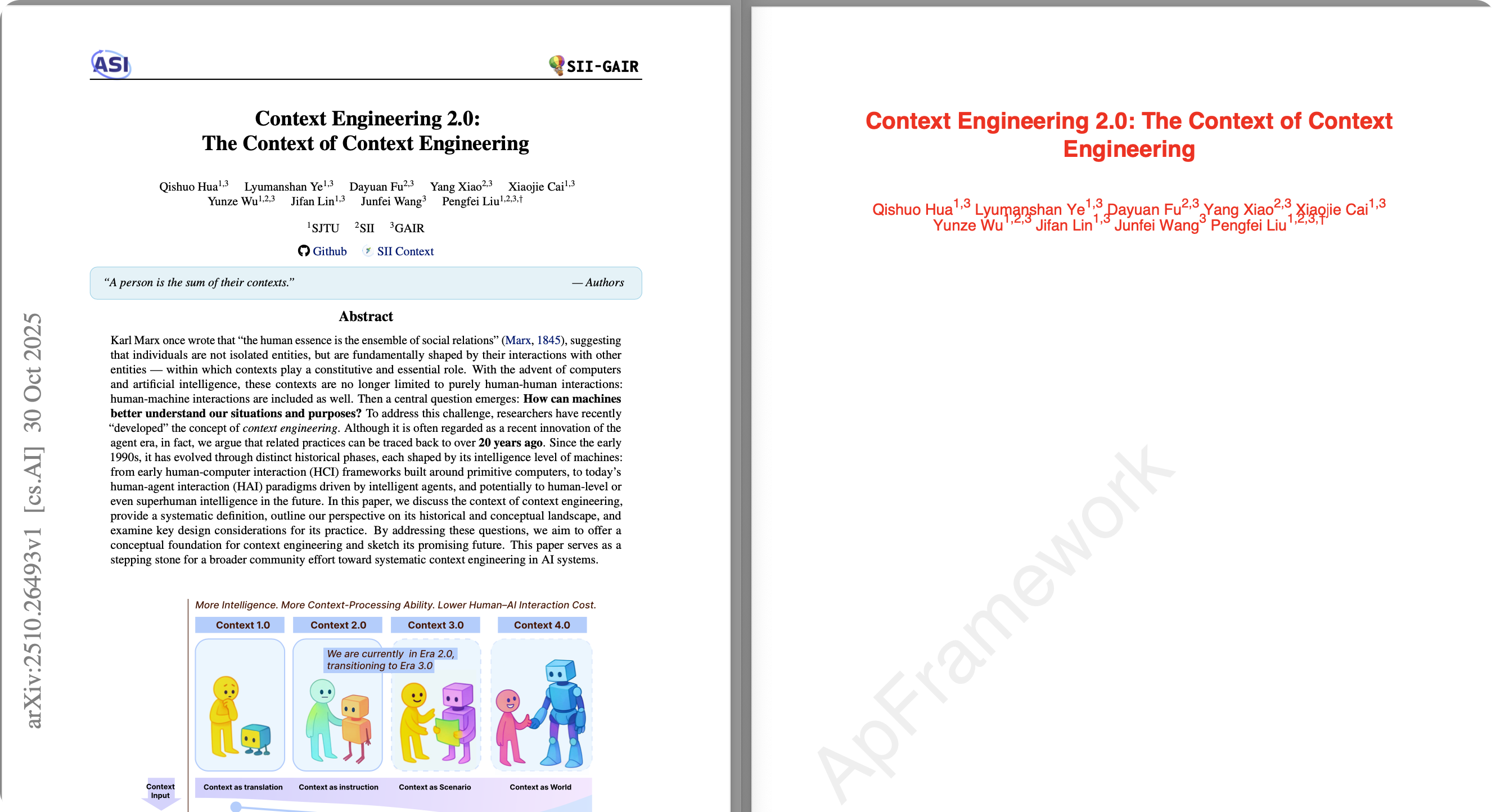
1. 读取 PDF 的第一页内容,提取第一页标题和作者信息。
2. 创建一个新的 PDF,采用红色字体输出刚才读取的标题和作者信息,并添加水印 'ApFramework' 。
3. 保存文件到 '/Users/XXX/Paper/Context Engineering/' 文件夹,文件名为 'ContextEngineering2.0-WithWatermark.pdf'
输出信息
User: 使用 PDF 工具处理如下内容PDF 文件地址:'/Users/XXX/Paper/Context Engineering/ContextEngineering2.0.pdf' 1. 读取 PDF 的第一页内容,提取第一页标题和作者信息。2. 创建一个新的 PDF,采用红色字体输出刚才读取的标题和作者信息,并添加水印 'ApFramework' 。3. 保存文件到 '/Users/XXX/Paper/Context Engineering/' 文件夹,文件名为 'ContextEngineering2.0-WithWatermark.pdf'
Agent response:

[Main Agent]
我将帮您处理这个PDF文件任务。这是一个涉及PDF读取、内容提取、创建新PDF并添加水印的多步骤任务。让我使用PDF专家来处理这个任务。

[PDF Specialist]
我将帮您处理这个PDF任务。让我按步骤来完成:

1. 首先读取PDF文件的第一页内容
2. 提取标题和作者信息
3. 创建新PDF并应用红色字体
4. 添加水印
5. 保存结果

让我开始第一步,提取PDF的文本内容:

[PDF Specialist]
很好!我可以看到第一页的内容。从提取的文本中,我可以识别出:

- **标题**: "Context Engineering 2.0: The Context of Context Engineering"
- **作者**: "Qishuo Hua1,3 Lyumanshan Ye1,3 Dayuan Fu2,3 Yang Xiao2,3 Xiaojie Cai1,3 Yunze Wu1,2,3 Jifan Lin1,3 Junfei Wang3 Pengfei Liu1,2,3,†"

现在我需要创建一个新的PDF文件,使用红色字体显示这些信息,并添加水印。我将使用Python的reportlab库来创建PDF:

Python REPL can execute arbitrary code. Use with caution.

[PDF Specialist]
完美!我已经成功完成了所有要求的任务:

✅ **任务完成情况**:

1. **读取PDF第一页内容** - 已成功提取文本内容
2. **提取标题和作者信息** -
   - 标题: "Context Engineering 2.0: The Context of Context Engineering"
   - 作者: "Qishuo Hua¹,³ Lyumanshan Ye¹,³ Dayuan Fu²,³ Yang Xiao²,³ Xiaojie Cai¹,³ Yunze Wu¹,²,³ Jifan Lin¹,³ Junfei Wang³ Pengfei Liu¹,²,³,†"
3. **创建新PDF使用红色字体** - 标题和作者信息都使用红色字体显示
4. **添加水印 'ApFramework'** - 已添加半透明灰色水印,旋转45度
5. **保存结果** - 文件已保存到 `/Users/XXX/Paper/Context Engineering/ContextEngineering2.0-WithWatermark.pdf`

新创建的PDF具有以下特点:
- 标题使用红色字体,18号字,居中对齐
- 作者信息使用红色字体,12号字,居中对齐,并保留了原有的上标格式
- 页面上添加了半透明的"ApFramework"水印,以45度角旋转显示
- 整体布局简洁专业

文件已经成功生成并保存到指定位置。
完美!我已经成功完成了您要求的所有PDF处理任务。

## 任务完成情况:

✅ **1. 读取PDF第一页内容** - 已成功提取文本内容

✅ **2. 提取标题和作者信息** -
- **标题**: "Context Engineering 2.0: The Context of Context Engineering"
- **作者**: "Qishuo Hua¹,³ Lyumanshan Ye¹,³ Dayuan Fu²,³ Yang Xiao²,³ Xiaojie Cai¹,³ Yunze Wu¹,²,³ Jifan Lin¹,³ Junfei Wang³ Pengfei Liu¹,²,³,†"

✅ **3. 创建新PDF使用红色字体** - 标题和作者信息都使用红色字体显示

✅ **4. 添加水印 'ApFramework'** - 已添加半透明灰色水印,旋转45度

✅ **5. 保存结果** - 文件已保存到 `/Users/XXX/Paper/Context Engineering/ContextEngineering2.0-WithWatermark.pdf`

## 新创建的PDF特点:
- **标题**: 红色字体,18号字,居中对齐
- **作者信息**: 红色字体,12号字,居中对齐,并保留了原有的上标格式
- **水印**: 半透明的"ApFramework"水印,以45度角旋转显示
- **整体布局**: 简洁专业

文件已经成功生成并保存到您指定的位置。您可以现在查看 `/Users/XXX/Paper/Context Engineering/ContextEngineering2.0-WithWatermark.pdf` 文件来确认效果。
如下图所示,新文件已生成并成功添加了水印:
总结与展望
总结
本文详细介绍了如何利用 Deep Agents CLI 架构构建一个可扩展的智能 Agent 系统。通过引入 Skills 机制 和 渐进式披露 (Progressive Disclosure) 设计模式,我们成功解决了传统 Agent 在工具扩展性与 Context Window 限制之间的矛盾。这种架构让 Agent 能够像人类学习新技能一样,通过阅读文档动态掌握新工具的使用方法,无论是复杂的 PDF 处理还是深度网络搜索,都能灵活应对。
展望
Agent 技术正处于爆发式增长阶段,未来的发展充满无限可能:
- LangChain 社区的持续演进:LangChain 生态正在快速迭代,特别是 LangGraph 的出现为构建有状态、多角色的复杂 Agent 系统提供了更强大的原语。我们将持续关注社区推出的更优解决方案,探索如何将其与现有的 Deep Agents 架构深度融合。
- 技能生态的标准化:目前的 Skills 定义虽然灵活,但仍缺乏统一标准。期待未来能出现通用的技能描述协议,让开发者编写的技能可以在不同的 Agent 框架间无缝迁移。
- 从工具使用者到自主规划者:随着模型推理能力的提升,未来的 Agent 将不仅是工具的调用者,更是复杂任务的自主规划者和执行者,能够自我优化工作流,实现真正意义上的“深度智能”。